5th MEASUREMENT
Home
The Measurement module is a standard part of all projects in the Mawis Geoportal. It is used to obtain coordinates and measure distances and areas on the map. It is a space where the user can easily add their own drawing to the map composition and then export it with tabular data with coordinates, distances and annotations.
Access to the module
- The module is accessible via the pencil icon crossed with the ruler in the project main bar
- The module designation is “Measurement”
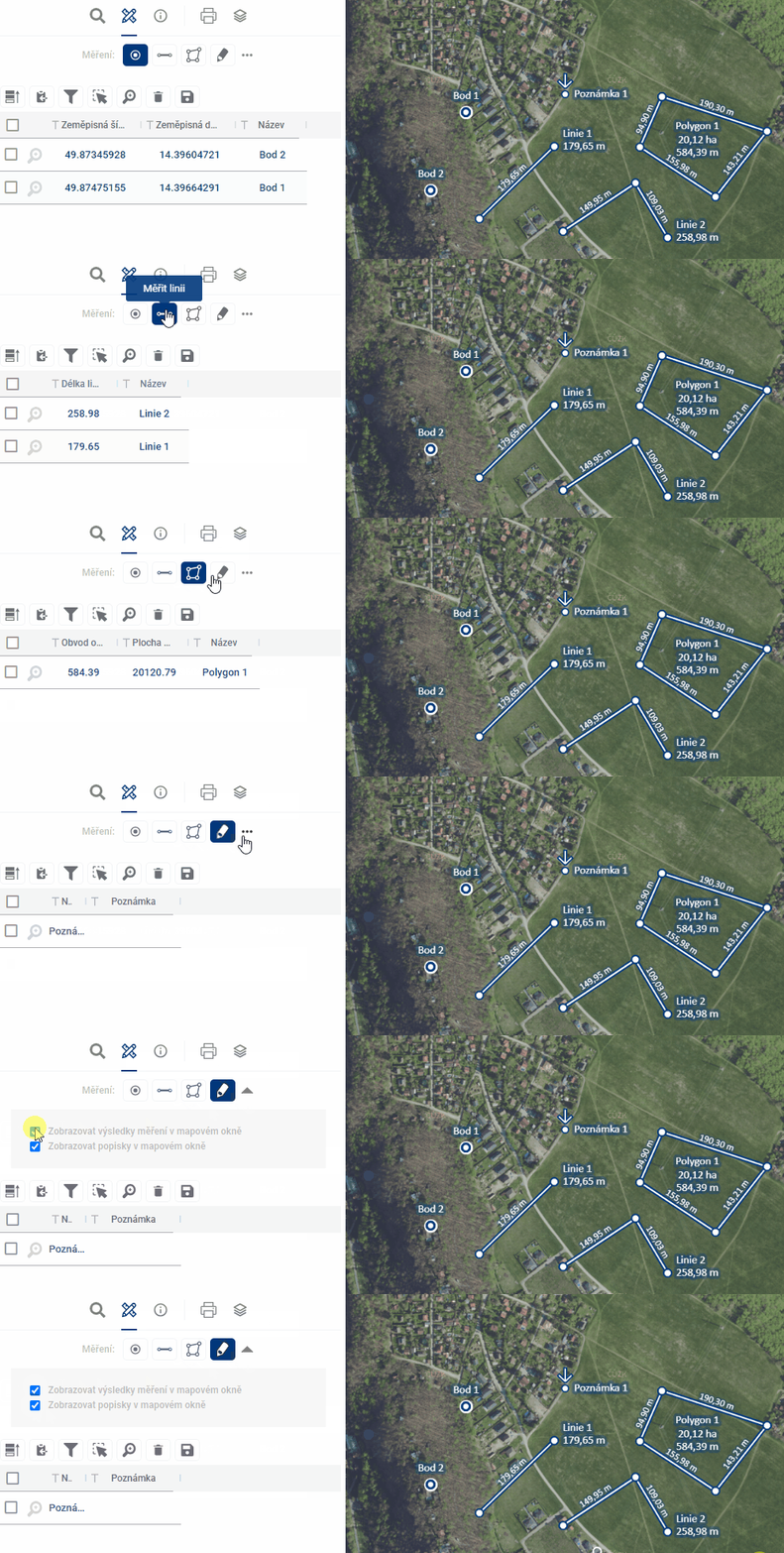
There is a menu for drawing points, lines, areas and notes, which will be described in more detail below. The expansion menu below the three dots on the right allows you to decide whether to display text descriptions and measured values for the drawn features in the map window.
Module functions
The module includes the possibility to draw and manage 4 basic types of geometric elements:
Each geomteria type is also managed by a separate measurement results table
- Ability to create and manage all types of geometric elements
- Elements are displayed on the map and in the spreadsheet
- Option to Export marked data into a table or SHP file (shapefile)
- Ability to share data with other users
Manage layer visibility
- Access via Layer Organiser
- In the “User Layers” section you will find:
- Layers of drawings
- Measurement point
- Line measurement
- Measuring polygon
- Measurement note
- Layers of drawings
- Possibility of switching on/off individual layers
Working with data
Types of data storage
-
Temporary elements
- Marked with a clock icon
- Disappears after closing the application
-
Saved for users
- Only available for logged in user
- It will appear the next time you log in
-
Saved for everyone
- Visible to all project users
- Suitable for sharing and collaboration
Tabular display
- Search in records
- Filtering by columns
- Tagging of records
- Zooming in on selected features on the map (magnifying glass with plus sign)
- Delete records (trash icon) see Measurement results table
Data export
- Export to spreadsheet
- Export to SHP file (shapefile)
- It is used, for example, to send to the data manager for adding to the map in the project’s persistent layers.
Permanent data storage
- Temporary layers can only be converted to permanent layers via the administrator
- Elements saved “for me” and “for all” are available in user layers
- Access via the “Drawing layers” section by geometry type
Use for collaboration
- Suitable for information exchange between processors and users
- Possibility of commenting and commenting on the records
- Sharing via link with other project users